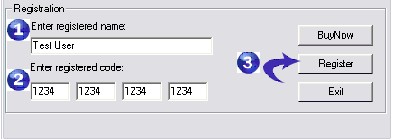
As soon as your order have been approved, you will receive a Email that include your registration name and registration code.
Please complete the following simple steps to get the full version of your product.
1. Click the "Register" button, it will open a Registration Dialog.
2. it will open a Registration Dialog.
3. Please fill your name and registration code in the right field.(Note:4 letters for one registration code edit field.)
4. Click the "Register" button in the Registration Dialog.
5. Restart the software.
If the program said the registered code is error:
Normally because we have upgraded the program, and you can follow these steps to resolve the problem:
1. Please activate the Control Panel, double click Add/Remove Programs, search for "PDF Encrypter" listbox entry and Remove the program.
2. Please download the newest version of PDF Encrypter from http://www.8848soft.com/download.htm , Double click the install file which you download from our web site . It is strongly recommended that you accept the installation default settings (just press OK, Yes, or Next, as appropriate).
3. Please use the registered code to unlock PDF Encrypter.