|
Convert Doc to PDF For Word lets you instantly convert
Microsoft Word documents into fully-formatted and
professional-quality PDF file format. Functioning as a
plug-in to the applications that you use every day -
Microsoft Word 2000/XP/2003. Now you can create and
convert PDF files in Microsoft Word, without the need
for Adobe® Acrobat®!.
 Microsoft
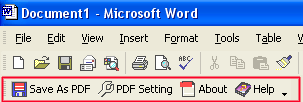
Word Integration - Convert Doc to PDF For Word
adds toolbars to Microsoft Word, allowing users true
one-click PDF file creation. Microsoft
Word Integration - Convert Doc to PDF For Word
adds toolbars to Microsoft Word, allowing users true
one-click PDF file creation.
Using Convert Doc to PDF in Microsoft Word
Simply choose File/Open in Microsoft Word to open a
original Word document, then click the "Save as PDF"
button in the toolbar to instantly create a PDF file
from the Word document.
Convert Doc to PDF For Word retains the layout of the
original Doc document, and it supports all PDF file
settings, such as PDF Compatibility, Auto-Rotate,
Resolution, Compress settings of PDF document, Colors
settings of PDF document, Fonts settings of PDF
document. | 











 Convert
Doc to PDF For Word is the fast, affordable way
to create professional-quality documents in the
popular PDF file format. Its easy-to-use
interface allows you to create PDF files by
simply click the "Save as PDF" button from MS
Word, creating documents which can be viewed on
any computer with a PDF viewer. Convert Doc to
PDF For Word supports Font embedding,
resolution, compression and multi-language. And
Convert DOC to PDF For Word does not need any
software such as adobe acrobat.
Convert
Doc to PDF For Word is the fast, affordable way
to create professional-quality documents in the
popular PDF file format. Its easy-to-use
interface allows you to create PDF files by
simply click the "Save as PDF" button from MS
Word, creating documents which can be viewed on
any computer with a PDF viewer. Convert Doc to
PDF For Word supports Font embedding,
resolution, compression and multi-language. And
Convert DOC to PDF For Word does not need any
software such as adobe acrobat.